Textarea with Line Numbers in React
This article demonstrates how to create a re-usuable custom textarea component in React with line numbers. I used TypeScript and Styled-Components but feel free to use whichever tools you're comfortable with. A complete code can be found in this CodeSandbox.
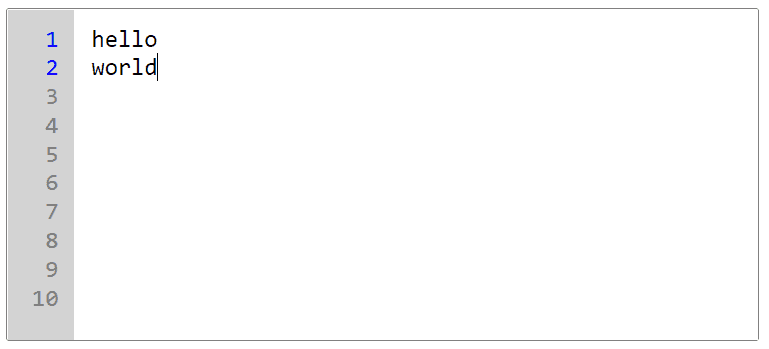
Step 1: Create controlled textarea
If you wish control the value outside of the component, pass in value and onValueChange as props.
type TextareaProps = {  value: string;  onValueChange: (value: string) => void;  placeholder?: string;  name?: string;};
export const Textarea = ({  value,  onValueChange,  placeholder,  name,}: TextareaProps) => {  const handleTextareaChange = (    event: React.ChangeEvent<HTMLTextAreaElement>  ) => {    onValueChange(event.target.value);  };
  return (    <textarea      name={name}      onChange={handleTextareaChange}      placeholder={placeholder}      value={value}      wrap="off"    />  );};
Step 2: Add numbers to each line
Here comes the challenging part of this component. I want to add numOfLines as props so this component remains as reusuable and as flexible as possible. I then want to convert numOfLines into an array so it can iterate and render on the UI.
I used useMemo to count the number of lines in value and to create an array because this component will constantly re-render as user types into the textarea. By using useMemo, the function will only execute when the dependencies change.
The newly created array (linesArr) should watch for lineCount and be added to the array as user adds line breaks.
type TextareaProps = {  // ... previous props  numOfLines: number;};
export const Textarea = ({  // ... previous props  numOfLines,}: TextareaProps) => {  // count the number of lines in `value`  const lineCount = useMemo(() => value.split("\n").length, [value]);  // create array  const linesArr = useMemo(    () =>      Array.from({ length: Math.max(numOfLines, lineCount) }, (_, i) => i + 1),    [lineCount, numOfLines]  );
  return (    <div>      <div>        {linesArr.map((count) => (          <div key={count}>{count}</div>        ))}      </div>      <textarea />    </div>  );};
Step 3: Style the components
const StyledTextareaWrapper = styled.div`  border: 1px solid grey;  border-radius: 2px;  width: 500px;  height: 220px;`;
const sharedStyle = css`  margin: 0;  padding: 10px 0;  height: 200px;  border-radius: 0;  resize: none;  outline: none;  font-family: monospace;  font-size: 16px;  line-height: 1.2;  &:focus-visible {    outline: none;  }`;
const StyledTextarea = styled.textarea`  ${sharedStyle};  padding-left: 3.5rem;  width: calc(100% - 3.5rem);  border: none;  &::placeholder {    color: grey;  }`;
const StyledNumbers = styled.div`  ${sharedStyle};  display: flex;  flex-direction: column;  overflow-y: hidden;  text-align: right;  box-shadow: none;  position: absolute;  color: grey;  border: none;  background-color: lightgrey;  padding: 10px;  width: 1.5rem;`;
// ...export const Textarea = ({}: TextareaProps) => {  // ...  return (    <StyledTextareaWrapper>      <StyledNumbers>        {linesArr.map((count) => (          <div key={count}>{count}</div>        ))}      </StyledNumbers>      <StyledTextarea />    </StyledTextareaWrapper>  );};
Step 4: Synchronize the position of textarea and the numbers wrapper on scroll
What I want to achieve in this step is when <StyledTextarea /> scrolls, <StyledNumbers /> scrolls simultaneously. To acheive this, I make use of useRef. Here's the implementation:
// 1. Define refsconst lineCounterRef = useRef<HTMLDivElement>(null);const textareaRef = useRef<HTMLTextAreaElement>(null);
// 3. Add onScroll handlerconst handleTextareaScroll = () => {  if (lineCounterRef.current && textareaRef.current) {    lineCounterRef.current.scrollTop = textareaRef.current.scrollTop;  }};
// 2. Place refs in componentsreturn (  <StyledTextareaWrapper>    <StyledNumbers ref={lineCounterRef}>      {linesArr.map((count) => (        <div key={count}>{count}</div>      ))}    </StyledNumbers>    <StyledTextarea ref={textareaRef} onScroll={handleTextareaScroll} />  </StyledTextareaWrapper>);
Final Code
import React, { useMemo, useRef } from "react";import styled, { css } from "styled-components";
type TextareaProps = {  value: string;  numOfLines: number;  onValueChange: (value: string) => void;  placeholder?: string;  name?: string;};
const StyledTextareaWrapper = styled.div`  border: 1px solid grey;  border-radius: 2px;  width: 500px;  height: 220px;`;
const sharedStyle = css`  margin: 0;  padding: 10px 0;  height: 200px;  border-radius: 0;  resize: none;  outline: none;  font-family: monospace;  font-size: 16px;  line-height: 1.2;  &:focus-visible {    outline: none;  }`;
const StyledTextarea = styled.textarea`  ${sharedStyle}  padding-left: 3.5rem;  width: calc(100% - 3.5rem);  border: none;  &::placeholder {    color: grey;  }`;
const StyledNumbers = styled.div`  ${sharedStyle}  display: flex;  flex-direction: column;  overflow-y: hidden;  text-align: right;  box-shadow: none;  position: absolute;  color: grey;  border: none;  background-color: lightgrey;  padding: 10px;  width: 1.5rem;`;
const StyledNumber = styled.div<{ active: boolean }>`  color: ${(props) => (props.active ? "blue" : "inherit")};`;
export const Textarea = ({  value,  numOfLines,  onValueChange,  placeholder = "Enter Message",  name,}: TextareaProps) => {  const lineCount = useMemo(() => value.split("\n").length, [value]);  const linesArr = useMemo(    () =>      Array.from({ length: Math.max(numOfLines, lineCount) }, (_, i) => i + 1),    [lineCount, numOfLines]  );
  const lineCounterRef = useRef<HTMLDivElement>(null);  const textareaRef = useRef<HTMLTextAreaElement>(null);
  const handleTextareaChange = (    event: React.ChangeEvent<HTMLTextAreaElement>  ) => {    onValueChange(event.target.value);  };
  const handleTextareaScroll = () => {    if (lineCounterRef.current && textareaRef.current) {      lineCounterRef.current.scrollTop = textareaRef.current.scrollTop;    }  };
  return (    <StyledTextareaWrapper>      <StyledNumbers ref={lineCounterRef}>        {linesArr.map((count) => (          <StyledNumber active={count <= lineCount} key={count}>            {count}          </StyledNumber>        ))}      </StyledNumbers>      <StyledTextarea        name={name}        onChange={handleTextareaChange}        onScroll={handleTextareaScroll}        placeholder={placeholder}        ref={textareaRef}        value={value}        wrap="off"      />    </StyledTextareaWrapper>  );};
Using this component
import React, { useState } from "react";import { Textarea } from "./Textarea";
export default function App() {  const [value, setValue] = useState("");
  return (    <div>      <Textarea        name="test-textarea"        value={value}        onValueChange={(value: string) => setValue(value)}        numOfLines={10}      />    </div>  );}